

USCIS Global

Cutting a legal document's drafting time from 45 minutes to 7, by rebuilding a government workflow around the people who actually use it
I led the redesign of Notice to Appear (NTA) generation for USCIS, replacing a manual, multi-system process with one guided draft-and-review flow inside the interface officers already used. The result cut drafting time sharply, removed a class of template errors, and is now in weekly use across the field office network.
Date: Fall 2025 - Present
About this case study. I can't show the production tool publicly because of export-control restrictions. So I rebuilt the key screens as a standalone coded prototype, in Next.js with a custom design system, using made-up data. What you see below is the shipped design, not the live system, and none of it contains real case information.

Officers used to move between disconnected screens with no sense of progress. The redesign puts drafting and review in one guided flow, so it is always clear what is done, what is next, and what each step requires.
The situation
USCIS relies on custom-built software to generate a vast range of legal documents essential to asylum and refugee cases. However, years of patchwork updates led to inconsistent interfaces, manual workarounds, and pain points for both staff and applicants. Tasked with modernizing one of the core asylum case workflows, I worked within a cross-functional Agile team alongside developers, product owners, and business stakeholders.
I functioned as the lead designer, collaborating closely with my team and the stakeholders at USCIS up to the level of the branch chief. My responsibilities included:
-
Detailed mapping of the current state processes and pain points through hours of user research
-
Leading workshops to gather regulatory and operational requirements
-
Creating and iterating on high-fidelity prototypes covering multiple user roles and complex document scenarios
The current state
Prior to our redesign, Notice to Appear (NTA) document generation at USCIS was largely manual, highly fragmented, with error-prone copy/paste practices and poorly documented exception handling. Staff navigated outdated UI screens, redundant data entry points, and inconsistent templates, leading to:
-
Extended processing times for key application flows
-
High training overhead for new staff
-
Regulatory compliance risks due to template drift
Through qualitative research—user interviews, workflow observations, and process audits—we documented the detailed user journeys and surfaced recurring blockers.

Before and after overview of the document generation process.
Problem
Analysis revealed that the existing document generation process failed both the asylum applicants and the government users in several ways:
-
Labor-intensive workarounds: Staff must manually update templates and stitch together data from disparate systems
-
Inconsistent output: Version control errors and exceptions led to legal documentation mistakes
-
Missed automation opportunities: Repetitive tasks that should be automated consumed significant staff capacity
-
Poor feedback loops: Users lacked in-context validation or error-handling guidance

Research phase
We began by mapping the end-to-end NTA document issuance journey to expose redundant steps, error-prone handoffs, and the riskiest assumptions for adoption. I partnered with platform engineers and ELIS product teams to document the current state, then framed a lean, automation-first vision: remove manual tasks, pre-fill wherever possible, and instrument outcomes from day one.
The research phase also comprised:
-
Three rounds of research totaling about 8 hours of interviews, three role types, and five field offices
-
Stakeholder workshops and co-design sessions to solicit ideas from our stakeholders and subject-matter experts on the client team
A summary of our current state analysis and the improvements of our solution.

Building and testing
With a clear workflow map in hand, we shifted quickly into building and testing an automation-first drafting experience. Our goal was to eliminate manual data entry wherever possible by leveraging common document templates and pre-filling content from data already in the system. In early iterations, officers could generate a draft in seconds and then move through a structured document generation and review wizard that kept progress visible, reduced backtracking, and clarified what information was required at each step.
Just as important as speed was control. We centralized drafting and review into a single tool to resolve long-standing version-control issues and the “multiple sources of truth” that had emerged over years of workarounds. Instead of copying content between screens or maintaining parallel edits, officers could create, review, and revise within one guided flow, with clearer guardrails and fewer opportunities for template drift.
To ensure the new workflow held up in real conditions, we partnered closely with stakeholders and field users in small pilot groups. We ran rapid feedback cycles by sharing prototypes, validating assumptions, and incorporating learnings into the next build, so the tool evolved alongside day-to-day reality in field offices. That cadence helped us tune the wizard’s pacing, clarify review checkpoints, and surface edge cases early. Within two months, the pilot expanded several times beyond the initial group as office leaders requested additional testers, and the workflow rolled out broadly, culminating in a release across the full network of field offices.
Drafting used to start from a blank template stitched together by hand. Here the draft generates from existing case data in seconds, so the officer's first job is to review, not retype.
Constraints and tradeoffs
We made deliberate trade-offs to deliver value quickly while leaving room to iterate. Tight timelines meant the MVP focused on the essentials identified through stakeholder alignment and user research: a reliable end-to-end flow, strong template reuse, and the most common scenarios needed to issue NTAs with confidence. We intentionally deferred lower-frequency edge cases and “nice-to-have” enhancements to stabilize the core wizard experience first and avoid adding complexity before we had real usage data.
To reduce risk, we treated launch as a learning process rather than a single event. We ran an alpha test and a limited pilot release to prove the workflow’s value in live conditions, then used structured feedback to prioritize enhancements. This collaborative approach—working side by side with a small set of field users and stakeholders—helped us validate usability and compliance needs, observe real-world exceptions, and expand scope steadily without compromising reliability.
One of the biggest constraints procedural rather than technical. Unlocking the next level of efficiency required a workflow change, which meant advocating with leadership and aligning across roles. By changing the order of two steps, we reduced development time by roughly 2–3 months and enabled greater automation earlier in the process. The revised workflow also reduced the number of people involved in producing the document from three to two, which lowered handoffs and delays and reduced opportunities for errors.

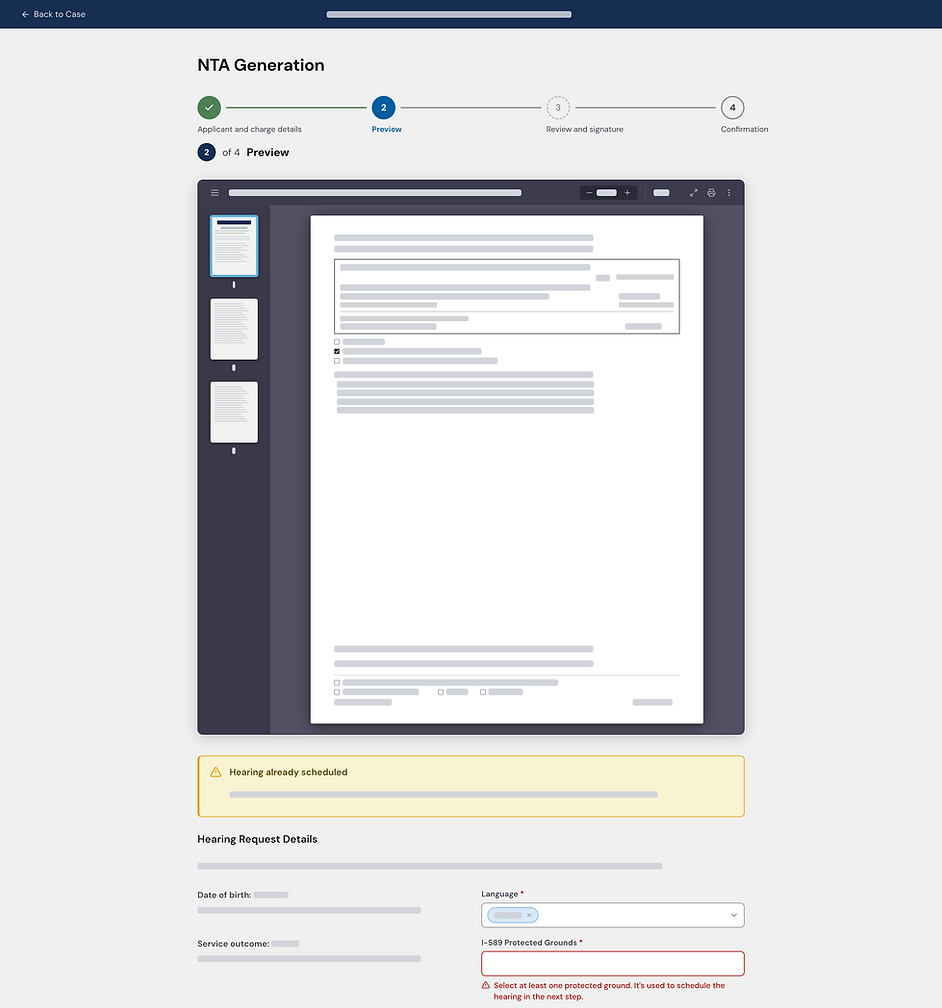
Each step asks only for what it needs and shows where the officer is in the process, cutting the backtracking and guesswork of the old flow.

38 min
Time savings (84% reduction) to generate documents for users
25.8k hrs
Time savings in last 6 months across 34.6k documents generated
200
Average number of officers per week using our generation tool
Results
The revamped document-generation workflow provided immediate and measurable efficiency improvements for USCIS staff, enhancing consistency and confidence in a crucial process. By replacing disjointed, manual drafting tools with an integrated experience within the officers' existing interface, the team minimized repetitive data entry, eliminated frequent copy-and-paste errors, and significantly streamlined the drafting and review process, making it easier to learn. This led to a more seamless end-to-end experience, reducing operational friction and establishing a reliable foundation for producing legally sensitive documents at scale.
The impact was significant across user groups. Our core user group saved about 38 minutes per document, equating to an 84% reduction. In the six months following the release, the enhanced workflow saved an estimated 25.8k staff hours across 34.6k generated documents, averaging about 4.3k hours saved each month.
Adoption rates continued to grow, with the system supporting 23k documents and saving 17.2k hours—around 5.7k hours per month—during the most recent three-month period, indicating increased usage and sustained performance. Currently, approximately 200 officers use the tool weekly, indicating that the new workflow not only improved metrics but also earned trust as part of their daily operations.